In 1992, Jean-Pierre Charras was working at the IUT de Grenoble in France. He began pulling a loose collection of electronics programs into one environment. The name came from the first letters of a friend’s company, “Ki”, joined to “CAD”: KiCad. Thirty-four years later, on 29 August 2026, KiCad 10.0.6 shipped for Windows, Linux and macOS, still under GPLv3 [1][2][3].
At the other end of the same chain sits a document published in 1980. Gerber Systems Corporation released a subset of RS-274-D for its vector photoplotters; that format became the common language of PCB fabrication. RS-274X followed in 1998, X2 in 2014 and X3 in 2020 [17][18]. A board travels between these two poles: a symbol on a screen, a net name, a copper trace, a fabrication file.
The motif of this guide is the netlist — the thin promise that the name you gave a wire in the schematic will survive as the same name on the board. Whatever tool you choose, the real question is whether that thread holds from idea to fabrication.
At a Glance: Five Tools, Five Roles
| Tool | First release | Licence | Platforms | Scope | Dominant file language | Best fit |
|---|---|---|---|---|---|---|
| KiCad | 1992 | GPLv3 | Windows, Linux, macOS | Schematic, PCB, ngspice simulation, 3D viewer | .kicad_sch, .kicad_pcb, S-expression |
Complex, multilayer, version-controlled design |
| LibrePCB | Started 2013, first stable 2018 | GPLv3 | Windows, Linux, macOS | Schematic, PCB, library management, CLI | Canonical S-expression | Learnable, offline PCB work with clean files |
| EasyEDA | 2013 | Commercial, freemium | Browser, desktop client | Schematic, PCB, SPICE, supply chain | Cloud project, Gerber export | Fast prototypes and the JLCPCB/LCSC route |
| LTspice | 1999 | Freeware, proprietary | Windows, macOS | Analogue SPICE simulation | .asc, .raw, .lib, .sub |
Power, audio and switching-regulator verification |
| Falstad / CircuitJS1 | Java applet; browser port later | GPL-2.0 | Browser, offline package | Real-time circuit simulation | URL and text-based circuit | Teaching, intuition and quick what-if work |
The release and licence data in this table were checked against official project pages, release notes and independent encyclopaedic records [1][2][3][5][9][10][12][15][16].
The Whole Map: From Schematic to Gerber
Electronic design automation is not one program. It is a pipeline. A schematic editor represents components and connections. The netlist is the machine-readable list of those connections. A PCB editor turns the netlist into physical layers, pads and copper traces. Design rule checking (DRC) asks whether that geometry can be manufactured. Gerber and drill files are the final image sent to the fab. A SPICE simulator tests the electrical behaviour of the same circuit before metal is cut [16][18].
Each link in that chain is a separate skill. That is why there is no single “best EDA tool”; there is only the question of which link is your bottleneck. Placing five tools at different points on the chain makes the comparison meaningful.
KiCad: Thirty-Four Years of Open-Source Memory
KiCad’s strength is not a single spectacular release. It is the length of its accumulation. The project started in Grenoble in 1992. From 2013, the BE-CO-HT section at CERN contributed developer time; in 2019 KiCad joined the Linux Foundation [3]. The CERN period mattered because it funded deep refactoring, not just feature patches. A codebase that had grown organically was rearranged to support professional work.
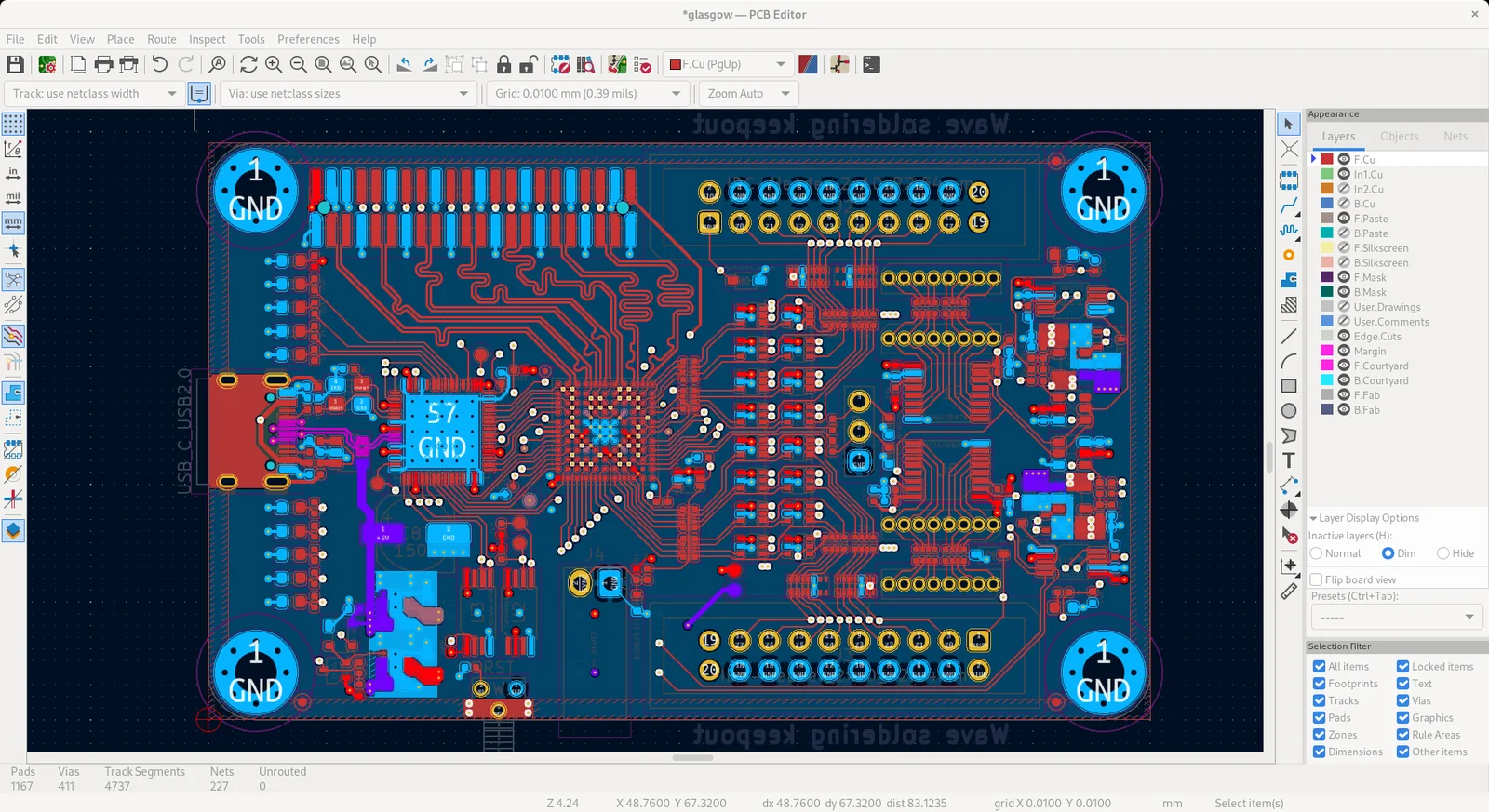
Today KiCad offers schematic capture, PCB layout, Gerber and IPC-2581 output, ngspice-based circuit simulation and STEP/VRML 3D board viewing [1][3]. The PCB editor supports up to 32 copper layers and stores dimensions in signed 32-bit integers at nanometre precision [3][20]. Push-and-shove routing, differential and single-ended length tuning, customisable DRC and Python scripting are part of the professional feature set.
First turn: free software is not cost-free software. The price is discipline, not money. KiCad keeps schematic symbols loosely coupled to footprints; one 0805 footprint can serve a resistor, a capacitor or an inductor [3]. That flexibility is freedom for an experienced designer and a trap for a beginner. If the symbol pin numbers do not match the footprint pad numbers, the schematic looks correct while the board is wired wrongly. KiCad’s punishment is discovering the error after fabrication.
The file format supports that discipline. Board files have been UTF-8, human-readable S-expressions since KiCad 4; schematic and library files followed in KiCad 6 [3][4]. This makes Git-style version control practical: diffs can be read, and scripts can extract component data. KiCad also imports Eagle, Altium, EasyEDA and LTspice files [4].
The weak side is the early learning curve. Layer stacks, net classes, design rules, library tables and 3D model matching all arrive at once. Even a simple board can feel heavy on the first evening. Once the workflow is set up, however, it repeats for years inside the same project tree. KiCad is less a tool for “a quick board today” and more a tool for “a board I must still be able to open in five years”. If the board also needs an enclosure, the 3D CAD software guide is the natural next step.
LibrePCB: A Young Rival That Puts the Library First
LibrePCB began in 2013 as a personal project of a Swiss electrical engineer. The first official stable release arrived in 2018; the application is written in C++20, Rust and Qt and built with CMake [6]. Version 2.1.1 was announced on 12 June 2026 [5]. The licence is GPLv3; it runs on Windows, Linux and macOS, offers 15 interface languages, and works offline without an account [5].
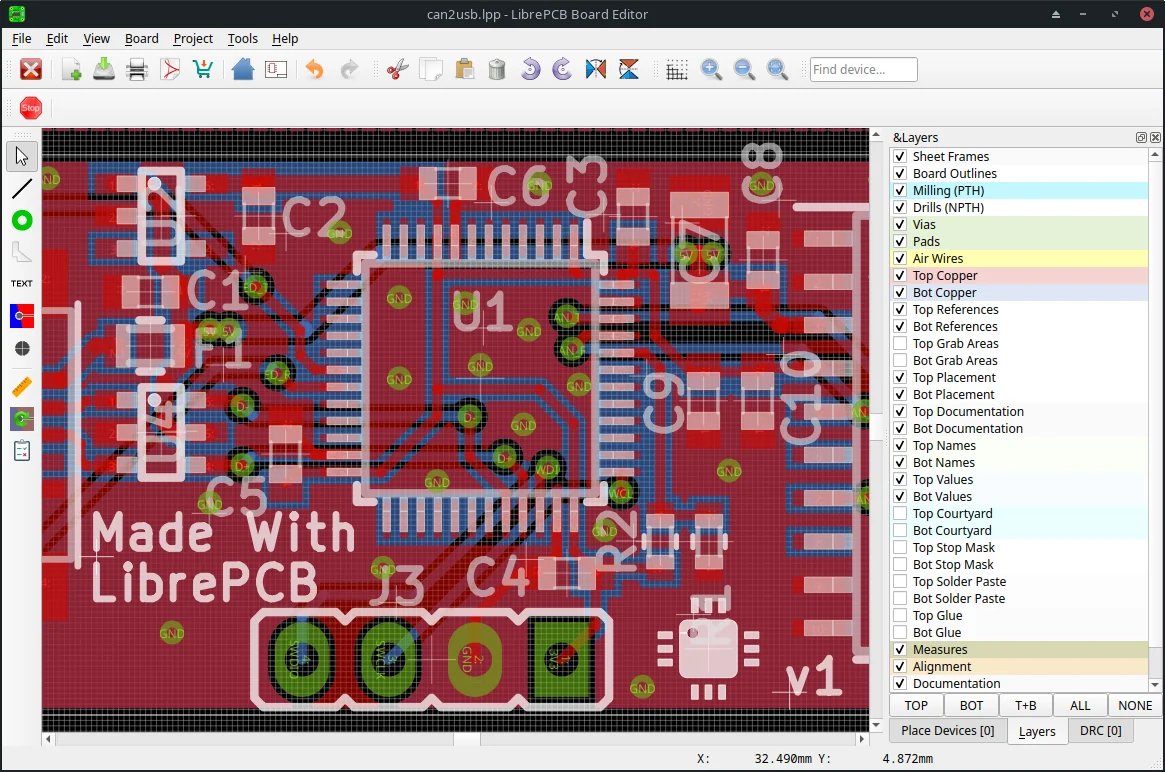
Its distinguishing idea is the semantic library. Symbols and footprints are not a random pile of graphics. They are organised by category, component, device and package relationships [5][7]. Every symbol, footprint, component and setting a project depends on is embedded in the project. The project is self-contained: open it on another computer with different installed libraries and it looks the same [7]. That removes the classic “a library update broke the project” failure mode.
The file format is S-expression based, but LibrePCB pushes further: the format is canonical, meaning there is exactly one representation for any given data set. User settings such as zoom and layer colours are separated from functional project settings, so version control does not collect meaningless diffs [7]. librepcb-cli can run library checks, production exports and validation headlessly in a CI pipeline [5].
Second turn: the simplicity comes with a boundary. The project’s own comparison page says plainly that KiCad is still more powerful. Hierarchical sheets, differential pairs and very complex boards favour KiCad; LibrePCB’s libraries are also smaller than KiCad’s [8]. LibrePCB is therefore not “the tool that does everything”. It is the tool that does the right thing simply. For small and medium boards, when clean files and library discipline matter more than advanced features, that boundary is a design choice rather than a defect.
EasyEDA: A Supply Chain That Opens in a Browser
EasyEDA was started in 2013 by Dillon He and Eric Cui and is now a division of JLCPCB [10]. The first version appeared online in August 2013; the official launch followed in March 2014 [10]. It combines schematic capture, SPICE simulation and PCB layout in one browser tab; the simulation engine is based on Ngspice [10].
Its strongest ground is the shortening of the distance between design and procurement. The library is linked to LCSC stock and pricing; a BOM can lead directly to an order. According to the official site, the Pro edition supports more than 500 sheets and 100,000 pins, while the Standard edition handles designs of 300 devices or 1,000 pads [9]. The same page also cites 6.58 million engineers and 52 million projects; those are the company’s own marketing figures and should be read with that in mind [9].
Third turn: the cloud is a trade between convenience and control. In EasyEDA the project lives in the browser; team members can open the same design, comment and inspect history. The price is that the owner of the file and the owner of the account may not be the same person. If the company account closes, the network fails or the terms change, a local copy may be the only way back in. EasyEDA exports Gerber, so fabrication data can leave the platform, but the source project does not always travel with the same ease [10][11].
An independent Hackaday review confirms that EasyEDA produces standard Gerber and that cloud collaboration is practical; the same article carries reader concerns about long-term access to cloud tools [11]. The Wikipedia article, meanwhile, carries promotional-tone and conflict-of-interest warnings in 2026 [10]. Together, those signals suggest keeping official numbers and independent observation in separate columns.
EasyEDA’s import list is worth noting: Altium, CircuitMaker, Eagle, KiCad and LTspice formats, with SPICE and PCB netlist export [10]. That makes it a useful gateway: move an existing design into the cloud for a review, then take Gerber to another fab if needed.
LTspice: It Does Not Draw Boards, It Draws Behaviour
LTspice was released in 1999 by Mike Engelhardt at Linear Technology under the name SwitcherCAD III; it passed to Analog Devices when Linear merged into ADI in 2017 [12]. It is a freeware SPICE simulator with no artificial limits on nodes, components or subcircuits [12]. It runs on Windows and macOS; there is no official Linux build, though it is known to run through Wine [12].
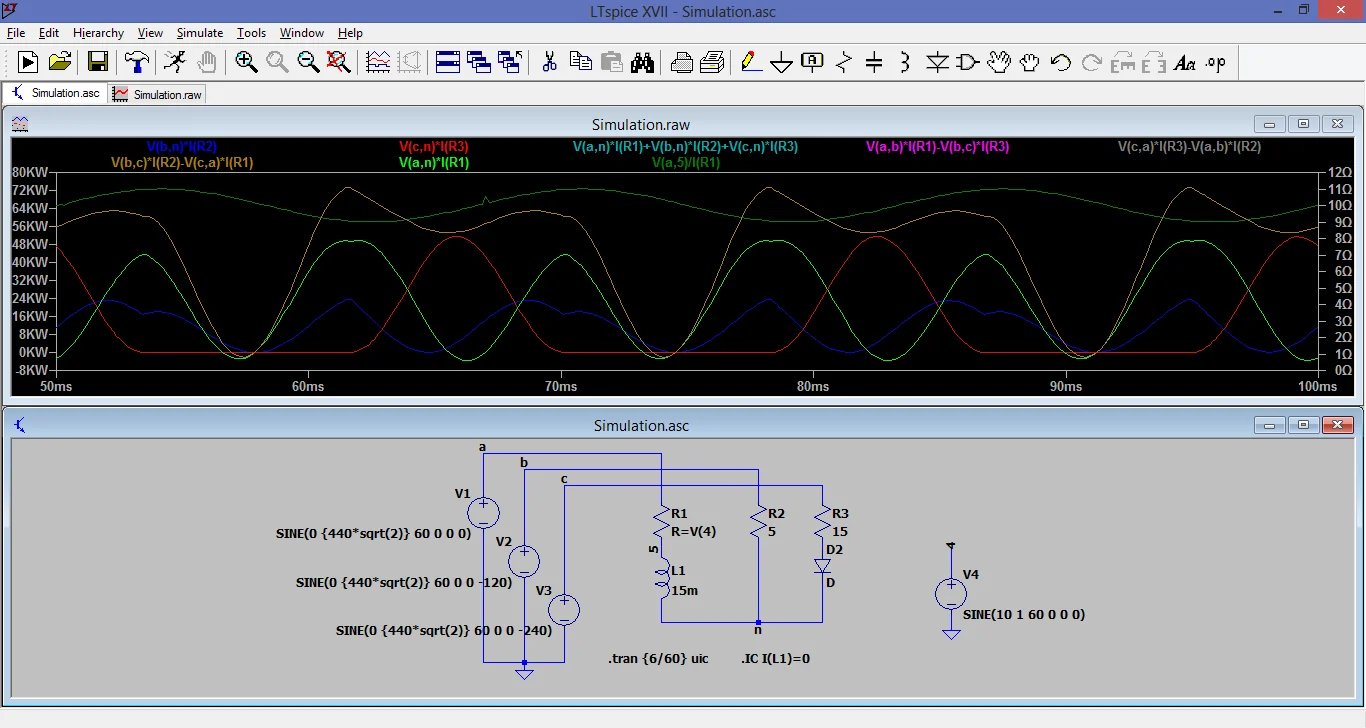
Its strength is speed in switching power supplies and analogue circuits. It performs transient, AC, DC, noise and transfer-function analyses and plots the waveforms [12]. It descends from Berkeley SPICE 3f5 but has diverged, so some features do not transfer one-to-one to other SPICE programs [12]. The file format is plain: .asc schematic, .raw simulation output, .plt plot settings, .lib and .sub model libraries [12].
Fourth turn: LTspice is not a PCB program. It can hand a netlist to a layout tool, but it does not draw the board, place parts or produce Gerber [12]. Treating it as an “alternative” to KiCad or EasyEDA is a category error. LTspice is the electrical verification link; the PCB link is completed elsewhere.
The second limit is model compatibility. A manufacturer’s .lib file may not match LTspice’s expected node order or syntax; symbol pins may not line up with subcircuit pins. LTspice ships with thousands of third-party models, but every new part still needs verification [12]. A simulation is only as good as its model. An ideal switch model will not show the thermal behaviour of a real MOSFET.
The licence matters too: freeware is not open source. It is proprietary; the source is not shared and distribution terms are set by the vendor [12]. If long-term archiving or replaceability is a priority, that difference should be a conscious part of the choice.
Falstad: A Classroom Blackboard Where the Circuit Moves
Paul Falstad’s circuit simulator began as a Java applet; Iain Sharp adapted it to run in the browser [14][15]. It now lives as CircuitJS1, developed in TypeScript and Vite, running in a browser or as an offline Electron package [15]. The licence is GPL-2.0 [15].
Its distinctive quality is that the circuit’s visual language does the explaining. Positive voltage is green, ground is grey, negative voltage is red; moving yellow dots show current [14]. A capacitor charging, an LC tank oscillating or a transistor switching is visible on the schematic itself rather than in a separate graph. For teaching and for building a beginner’s intuition, that feedback loop is unusually strong.
But Falstad is not a production tool. It has no PCB layout, DRC, Gerber output, BOM or library management. Circuits can be shared as a URL or text, which is ideal for a quick demonstration but insufficient for a version-controlled hardware project [15]. Think of it as an electronic sketchpad: test the idea quickly, then move to KiCad or LTspice for serious verification.
Comparison Matrix
| Criterion | KiCad | LibrePCB | EasyEDA | LTspice | Falstad |
|---|---|---|---|---|---|
| Schematic | Yes | Yes | Yes | Basic | Yes |
| PCB layout | Yes, 32 copper layers | Yes | Yes | No | No |
| SPICE simulation | ngspice integrated | Limited | Ngspice-based | Strong | Real-time, visual |
| Library model | Global/project libraries, Git-friendly | Semantic, embedded in project | Cloud, LCSC stock linked | .lib/.sub |
Built-in ideal models |
| File format | S-expression | Canonical S-expression | Cloud project, Gerber | .asc, .raw, .lib |
URL/text |
| Offline | Yes | Yes | Partly (desktop) | Yes | Yes (package) |
| Licence | GPLv3 | GPLv3 | Commercial | Freeware | GPL-2.0 |
| Learning curve | Steep | Moderate | Low | Moderate | Very low |
| Best for | Complex professional PCB | Clean files, small/medium boards | Fast prototypes, supply chain | Analogue/power verification | Teaching and intuition |
The matrix shows that the tools do not replace one another. The sensible combination is often start in Falstad, verify in LTspice, draw the board in KiCad or LibrePCB, and use EasyEDA when the supply chain is the deciding factor. Trying to force one tool to cover every link means compromising at every link.
Library Management: The Invisible Foundation
The most common EDA mistake is to treat the library as background. In reality, the symbol, footprint and 3D model trio defines the physical meaning of the netlist. KiCad libraries can be global or project-specific; users can add custom symbols and import from Eagle or Altium. Because symbol and footprint are loosely coupled, one footprint can serve several symbols, which makes library discipline essential [3].
LibrePCB puts the library at the centre of the product. Its library manager installs and updates libraries without requiring Git knowledge; renaming symbols, footprints, pins or pads does not break other elements. Because the project carries its own library, an update cannot break it [7][8]. That is a real advantage for teams and for projects with a long life.
In EasyEDA the library lives in the cloud and is tied to the supply chain. Selecting a part shows stock, price and alternatives, which saves time during prototyping. In return, library quality depends on community contributions and platform data; footprint verification before production remains your job [9][10].
In LTspice the library is a set of model files. You add a manufacturer model as .lib or .sub and match the symbol’s pin order to the subcircuit definition. A wrong model produces a wrong answer from a correct schematic. Falstad has no footprint library at all: it offers built-in ideal components, which speeds learning but does not represent real-world tolerances [14].
File Formats: What Each File Carries
KiCad: .kicad_sch schematic, .kicad_pcb board, .kicad_sym symbol library, .kicad_mod footprint. All are S-expression based, UTF-8 and human-readable [3][4]. Production output can be Gerber or IPC-2581 [1]. 3D output is STEP or VRML [3].
LibrePCB: projects and libraries are S-expression based canonical text files; the project is self-contained [7]. This makes Git diffs readable, but the project tree should be handled as a whole rather than as a list of extensions to memorise.
EasyEDA: the project is stored in the cloud; exports include Gerber, BOM, pick-and-place and PDF/PNG/SVG [10]. Gerber is enough for fabrication, but there is no complete offline equivalent of the source project. Regular exports and archives are therefore essential.
LTspice: .asc schematic, .raw simulation output, .plt plot settings, .lib/.sub model libraries [12]. Because .asc is ASCII, a circuit can be read in a text editor and reproduced in documentation or teaching notes.
Gerber: an ASCII vector format that carries the image of PCB layers. Standard Gerber arrived in 1980, RS-274X in 1998, X2 with metadata in 2014 and X3 with component information in 2020; revision 2024.05 is the current specification [17][18]. Ucamco calls the format the backbone of the electronics fabrication industry [17]. Gerber is an image format; without the source project and netlist it does not represent the whole design.
SPICE: a circuit simulation language developed at Berkeley by Laurence Nagel in 1973 and released as public domain software [16]. SPICE2 (1975) and SPICE3 (1989) extended it; version 3f5 appeared in 1993 [16]. A netlist describes components and connections as text; AC, DC, transient, noise and transfer-function analyses are its core commands [16]. LTspice and Ngspice are different branches of that inheritance.
Learning Curve and Hardware Reality
KiCad’s blank schematic is not friendly on first launch. Symbol selection, footprint assignment, net classes, layer stacks and DRC rules arrive together. A first board may take several evenings; a complex board may take months. That time comes from electronics design itself, not from the tool. Once the workflow is set, KiCad’s Python API and command-line tools make repetitive work automatable [3][4].
LibrePCB gets a first board going faster through its interface and library flow, but advanced features such as hierarchical sheets and differential pairs can stop you [8]. EasyEDA can put a first board in the browser within hours, but cloud dependency and account management add a new layer of learning. LTspice is quick for someone who already knows circuit theory; convergence errors can occupy a beginner for hours. Falstad works within minutes, which is exactly why it is so effective in teaching.
On the hardware side, no tool performs magic. For a concrete GPIO example that bridges board design and software, see the Raspberry Pi tips guide. A PCB editor that supports 32 copper layers still needs impedance, return-path and stack-up knowledge for high-speed work. LTspice’s fast solver delivers a wrong answer faster if the model is wrong. Falstad’s animation makes it easier to see why current flows, but it does not show manufacturing tolerances.
Decision Support Matrix: Which Tool for Which Situation?
| Situation | Recommended tool | Reason | Watch out for |
|---|---|---|---|
| First PCB fabrication | EasyEDA or LibrePCB | Fast start, ready libraries, low setup | Footprint verification and export |
| Complex multilayer board | KiCad | Layer support, DRC, Python, mature ecosystem | Library discipline and learning time |
| Offline work with clean files | LibrePCB | Self-contained project, canonical S-expression | Hierarchical sheets and advanced feature limits |
| Power supply / analogue verification | LTspice | Fast SPICE, strong model library | Proprietary licence, no PCB, model matching |
| Teaching / quick intuition | Falstad | Immediate visual feedback, no installation | No production output |
| A team sharing one design | EasyEDA or KiCad + Git | Cloud collaboration / version control | Access, privacy and backup |
| Supply chain and assembly | EasyEDA | LCSC/JLCPCB integration | Single-supplier dependency |
| Full control and freedom | KiCad, LibrePCB, Falstad | Open source, local operation | Support and learning cost |
This table is a starting point, not a recipe. Project scale, team structure, budget and deadline change the answer. What matters is knowing which link your chosen tool solves and which link it leaves outside.
Final Check Before Fabrication
- ERC and DRC: any unconnected pins, conflicting outputs or missing power nets?
- Netlist match: does every net in the schematic reach the same name and the correct pad on the PCB?
- Footprint verification: do pad numbers, pad sizes, drill diameters and courtyard match the manufacturer data?
- Gerber layers: are copper, solder mask, silkscreen, drill and profile layers complete? Open them in Ucamco’s reference viewer and inspect them visually [17].
- BOM: does every line have a manufacturer part number, an alternative and a quantity?
- 3D check: do tall components, connectors and the board edge collide?
- Archive: are the source project, library, production output and model files in one place? For cloud projects, is there a local backup?
This list cannot save a bad design with a good tool, but it can stop a good design from being wasted in fabrication.
For the wider open-source toolkit, the 239 free Windows software directory is a useful starting point.
Closing: The Thin Thread
The value of an EDA tool is not in how beautifully it draws on screen, but in whether every wire in the schematic keeps the same name on the board. KiCad offers thirty-four years of memory, LibrePCB a clean library, EasyEDA a fast supply chain, LTspice an electrical lens, and Falstad a window into the circuit’s motion. None fully replaces another; combined in the right order, they keep the chain from idea to fabrication intact.
So which tool will carry that chain in your next board? And behind the file you send to fabrication, is there a netlist you truly understand?
Sources and Verification
- KiCad EDA, “About KiCad” — kicad.org
- KiCad EDA, “KiCad 10.0.6 Release” (29 August 2026) — kicad.org/blog
- Wikipedia, “KiCad” — en.wikipedia.org
- KiCad Developer Documentation, “File Formats” — dev-docs.kicad.org
- LibrePCB, official home page (v2.1.1) — librepcb.org
- LibrePCB, “About the Project” — librepcb.org/about
- LibrePCB, “File Format” — librepcb.org/features
- LibrePCB, “Comparison With Other Tools” — librepcb.org/compare
- EasyEDA, official home page — easyeda.com
- Wikipedia, “EasyEDA” — en.wikipedia.org
- Hackaday, “EasyEDA Two Years Later” (5 December 2017) — hackaday.com
- Wikipedia, “LTspice” — en.wikipedia.org
- Analog Devices, “LTspice Simulator” — analog.com
- Paul Falstad, “Circuit Simulator Applet” — falstad.com
- GitHub, “pfalstad/circuitjs1” — github.com
- Wikipedia, “SPICE” — en.wikipedia.org
- Ucamco, “Gerber Format” — ucamco.com
- Wikipedia, “Gerber format” — en.wikipedia.org
- KiCad Developer Documentation, “Import Formats” — dev-docs.kicad.org
- KiCad Documentation, “PCB Editor – Capabilities” — docs.kicad.org