




Introduction: From a Las Vegas Blackjack Table to the Industry Standard
December 1993. Boston, Massachusetts.
Jon Hirschtick held a master’s degree in mechanical engineering from MIT. He had earned roughly 1 million dollars counting cards in Las Vegas casinos [1]. Hirschtick was a key player and instructor on the famous MIT Blackjack Team. Yet he chose not to build a casino empire. He focused on a single technical goal. In those days, 3D mechanical design was locked inside expensive Unix terminals. Workstations from Silicon Graphics and Sun cost 50,000 dollars. Software seats routinely exceeded 20,000 dollars. Engineers waited in queues to access a terminal. Hirschtick wanted to bring that modeling power straight to an office desktop. His goal was to build the first native 3D CAD application for Windows PCs [1].
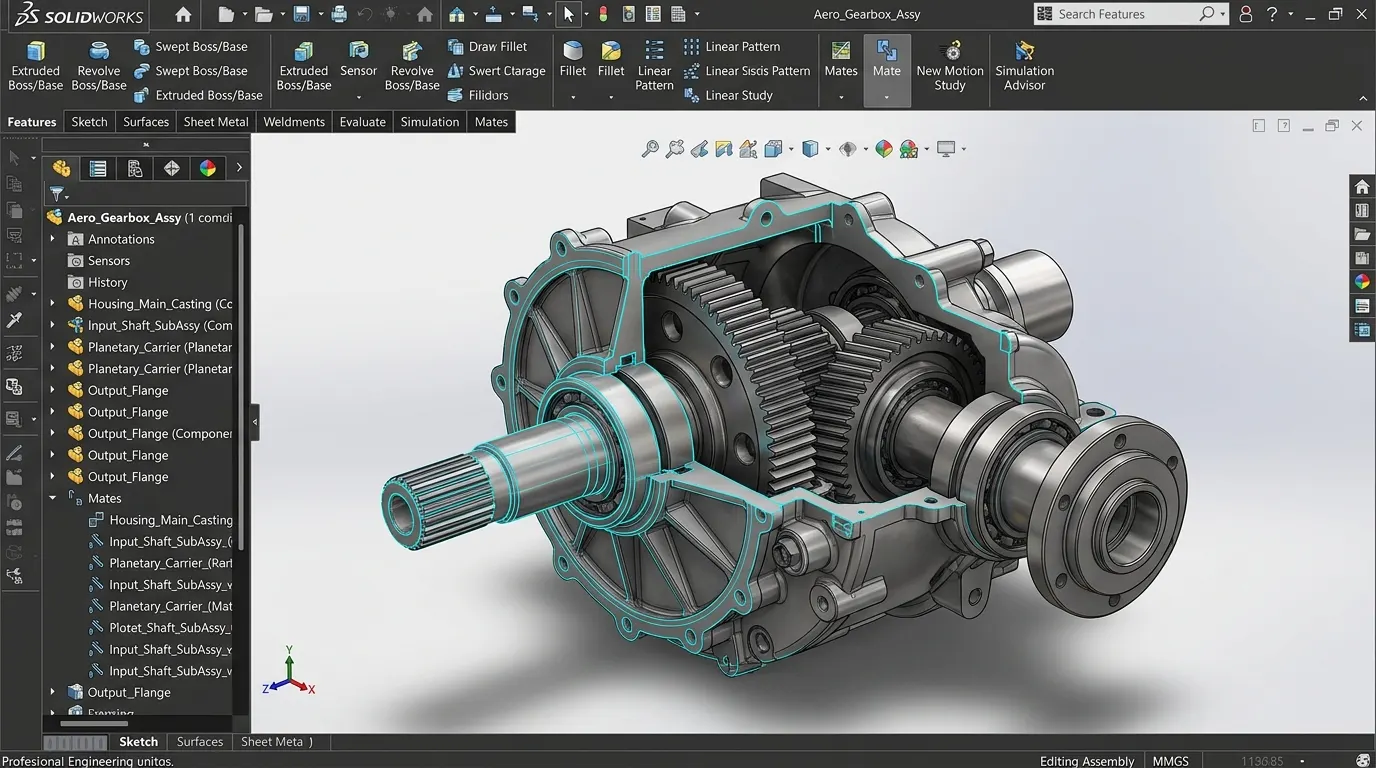
SOLIDWORKS is an industry-standard parametric 3D CAD software application developed by Dassault Systèmes, powered by the Siemens Parasolid geometric modeling engine. It serves as the primary mechanical and product development backbone for millions of engineering teams worldwide [2][3]. Within two years of release, it landed on hundreds of thousands of desks. In 1997, French aerospace giant Dassault Systèmes acquired the company for 310 million dollars [1]. Yet behind this commercial triumph lies one of the most intriguing technological paradoxes in software history.
SOLIDWORKS at a Glance
| Developer | Dassault Systèmes (Vélizy-Villacoublay, France) [2] |
|---|---|
| Geometric Modeling Kernel | Siemens Parasolid (B-Rep boundary representation and precision analytical topology) [3] |
| Current Version | SOLIDWORKS 2026 (SOLIDWORKS Design) — Released November 2025 [2] |
| Commercial Pricing (Annual) | Standard: ~$2,820/yr; Professional: ~$3,456/yr; Premium: ~$4,716/yr; Makers: ~$48/yr [2] |
| Licensing Model | Proprietary; Named-User Term Subscription and Perpetual (with mandatory Cloud Services) [2] |
| Supported Operating System | Microsoft Windows 10/11 64-bit (macOS and Linux utilize browser-based xDesign) [2] |
| Native File Formats | SLDPRT (Part), SLDASM (Assembly), SLDDRW (Drawing), Parasolid (.x_t, .x_b) [3] |
| Interoperability Exports | STEP (AP203/214/242), IGES, ACIS (SAT), 3MF, STL, OBJ, DWG, DXF, PDF, eDrawings [2] |
| Hardware Dependency | FeatureTree rebuilds depend directly on single-thread CPU clock frequency (GHz) [4] |
First Turn: The 4,000-Dollar Windows Disruption
In November 1995, SolidWorks 95 hit the market. It shook the computing industry.
At the time, PTC’s Pro/ENGINEER dominated mechanical engineering. That platform required expensive Unix workstations. Deploying a single seat meant investing upwards of 20,000 dollars. Engineers waited for terminal shifts. Companies rationed access to CAD tools.
Hirschtick and his team overturned that model. They launched the first native 3D parametric modeler built for Microsoft Windows 95. Their retail price was merely 4,000 dollars [1]. Established Unix vendors dismissed the product as an office toy. Yet practicing engineers immediately noticed the ergonomics. Familiar Windows dialogs, drag-and-drop mating, and fast drawing generation changed daily workflows. Within two years, SOLIDWORKS sold hundreds of thousands of licenses. It broke the Unix monopoly across manufacturing floors.
By 1997, Dassault Systèmes took decisive action. The French developer behind CATIA recognized the desktop shift. It acquired SolidWorks for 310 million dollars in stock [1].
Second Turn: The 30-Year Kernel Paradox
Here lies the most intriguing contradiction in modern enterprise software.
Jon Hirschtick did not write a geometric kernel from scratch. Time was critical. Instead, he licensed the Parasolid engine from EDS/Unigraphics [3]. That engine is owned today by Siemens Digital Industries Software. Parasolid computes boundary representation (B-Rep), complex fillets, and analytic surfaces with sub-micron precision. It provides rock-solid topological integrity.
When Dassault Systèmes bought SolidWorks, it already owned a world-class proprietary engine: CGM (Convergence Geometric Modeler), which powers CATIA. On paper, the roadmap looked obvious. Dassault should replace Siemens’ Parasolid engine and move SolidWorks onto its own CGM kernel.
In 2010, Dassault previewed this exact migration under the “SolidWorks V6” banner. However, the engineering world pushed back fiercely [3]:
- The Airbus Precedent: Engineers vividly remembered the transition from CATIA V4 to CATIA V5. That kernel change caused massive wiring and assembly mismatches on the Airbus A380 project, leading to billions of dollars in costly delays.
- Geometric Translation Risks: Millions of legacy client parts existed worldwide. Converting their feature histories onto a different kernel risked minor rounding variances. Even microscopic changes could destroy manufacturing tolerance stacks.
- Supply Chain Friction: Global CNC machine shops, mold makers, and CAM systems communicated natively via Parasolid (
.x_t) files. Altering the core format threatened entire production networks.
Facing widespread customer concern, Dassault paused the transition. Even today, desktop SOLIDWORKS remains firmly anchored to the Parasolid kernel, paying annual royalties to Siemens, its primary corporate rival [3].

Third Turn: Workstation Architecture and the Cloud Transition
Engineering managers and IT directors focus on two operational priorities: workstation performance optimization and cloud licensing policies.
1. CAD Modeling vs. Simulation: Core Count or Clock Frequency?
Hardware procurement requires understanding workload characteristics. FEA stress analysis, CFD fluid dynamics, and Visualize photorealistic rendering benefit heavily from multi-core parallelization. In these solver tasks, 16 or 32 cores significantly reduce calculation times. This explains why engineering firms invest in multi-threaded hardware [4].
However, when a workstation is dedicated primarily to parametric solid modeling, assembly mating, and 2D drafting, the computational demands change completely:
The SOLIDWORKS FeatureTree is inherently sequential. Step four cannot be computed until step three finishes. Step three depends entirely on solving step two. These geometric features are mathematically interdependent. The calculation cannot be partitioned across multiple CPU cores. As a result, the primary modeling engine in SOLIDWORKS runs on a single CPU thread [4].
For dedicated CAD modeling seats, adding more CPU cores does not speed up assembly rebuilds. What matters most is peak single-core clock frequency (5.0+ GHz), modern instructions per clock (IPC), and low-latency system memory [4].
2. Cloud Strategy: The July 1, 2023 Policy Shift
Dassault Systèmes has steadily expanded its 3DEXPERIENCE cloud platform. On July 1, 2023, it introduced a significant licensing update [5].
All newly purchased perpetual desktop SOLIDWORKS licenses now include mandatory Cloud Services [5]. Even when working on a local workstation, users pay an annual maintenance fee that covers cloud storage, revision tracking, and browser sharing. This update effectively turned perpetual ownership into a hybrid cloud subscription model. For defense suppliers and security-conscious facilities, keeping intellectual property connected to cloud servers remains an ongoing evaluation point.
Decision Support Matrix: Strengths and Boundaries
To help technical teams evaluate investments, here is an objective assessment of SOLIDWORKS:
Key Advantages
- Manufacturing Precision: The Parasolid engine ensures flawless tolerance compliance across CNC milling, sheet metal bending, and mold making.
- Top-Down Assembly Design: Master layout sketches allow parametric control over complex machines. Adjusting a core dimension automatically updates the entire assembly.
- Broad Talent Pool: SOLIDWORKS is the most widely taught 3D CAD platform in universities. Hiring proficient engineers and drafters is straightforward.
- Integrated Tooling Suite: Native sheet metal tools, weldment libraries, mechanical mates, and Visualize rendering exist within one unified ecosystem.
Operational Limitations
- Maintenance Overhead: Halting annual maintenance prevents opening newer file versions. Recent licenses require mandatory cloud service fees [5].
- Single OS Platform: Native desktop tools run exclusively on Microsoft Windows [2].
- Class-A Surfacing Limits: While exceptional for prismatic mechanical design, complex organic automotive styling is better served by CATIA or Alias.
CAD Alternatives Comparison Matrix
A technical overview of competing mechanical modeling platforms is summarized below:
| Software | Developer | Modeling Kernel | Pricing Model | Primary Strength |
|---|---|---|---|---|
| SOLIDWORKS | Dassault Systèmes | Siemens Parasolid | Subscription / Hybrid Perpetual | Mechanical assemblies, sheet metal, mold tooling, and market adoption |
| Autodesk Inventor | Autodesk | ShapeManager | Annual Subscription (~$2,500/yr) | AutoCAD ecosystem integration and parametric machine engineering |
| Siemens NX | Siemens Digital Ind. | Parasolid (Native) | Enterprise Licensing / Modular | High-end aerospace/automotive, massive assemblies, and unified CAM |
| Onshape | PTC | Parasolid (Cloud) | SaaS Subscription ($1,500-$2,500/yr) | Pure browser-based cloud CAD with simultaneous team collaboration |
| FreeCAD | Open Source Community | Open CASCADE (OCCT) | Free (LGPLv2+) | Zero licensing fees, open source codebase, and Python scriptability |
Conclusion and Editorial Verdict
SOLIDWORKS toppled the Unix establishment using card-counting earnings from a Las Vegas casino. Yet today, its defining challenge does not come from competitors. It centers on guiding a loyal desktop user base into the 3DEXPERIENCE cloud ecosystem.
For technical directors and machine shop leaders, the operational takeaway is clear. Align hardware spending with specific tasks. Simulation and rendering stations need high core counts. In contrast, dedicated solid modeling seats require maximum single-core clock speeds (5.0+ GHz) and fast NVMe storage. When planning license renewals, review how 3DEXPERIENCE cloud requirements align with your intellectual property standards.
Two essential questions remain for engineering leaders:
- Has your team separated dedicated CAD modeling workstations from multi-core simulation systems to maximize single-thread performance?
- Does anchoring proprietary mechanical designs to the 3DEXPERIENCE cloud layer enhance collaboration, or introduce unnecessary dependencies for your workflow?
References and Verification
Version specifications, licensing terms, and historical documentation cited in this review are verified via independent industry references:
- Hirschtick, Jon. MIT Blackjack Team & Founding of SolidWorks Corp (1993–1995) — en.wikipedia.org/wiki/Jon_Hirschtick
- Dassault Systèmes Official — Introducing SOLIDWORKS 2026 Technical Specs & Pricing — solidworks.com/media/introducing-solidworks-2026
- Siemens Digital Industries Software — Parasolid 3D Geometric Modeling Kernel Reference — siemens.com/parasolid
- SolidWorks Workstation Hardware Guide & Single-Thread CPU Frequency Impact — solidworks.com/support/system-requirements
- Dassault Systèmes Policy Announcement — Mandatory Cloud Services on Perpetual CAD Licenses (July 2023) — solidworks.com/cloud-solutions