




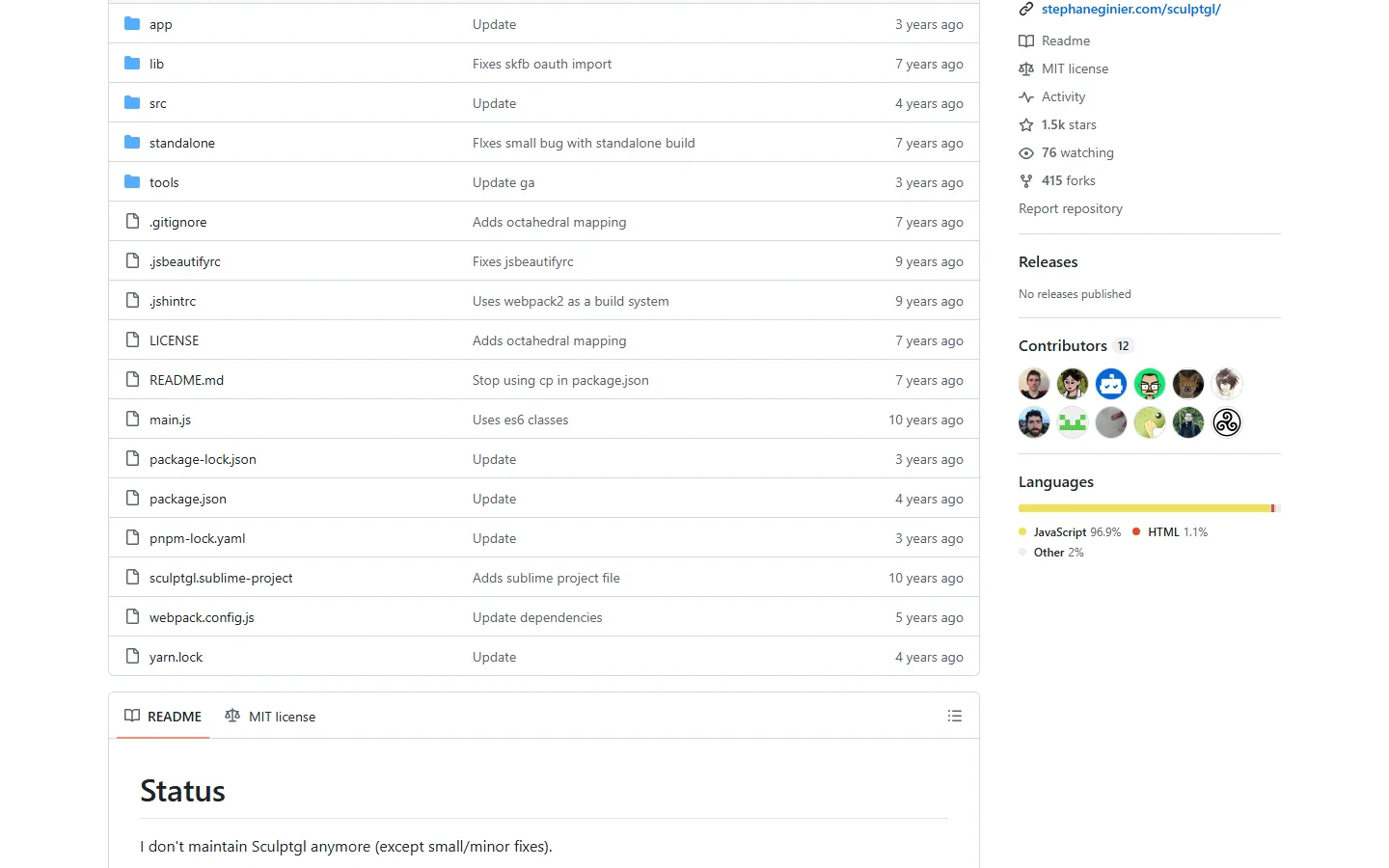
17 January 2026. The GitHub repository for SculptGL was archived by its owner. The page stayed online, the code stayed readable and the WebGL build stayed usable, but the project became read-only. The About text is blunt: “DEVELOPMENT STOPPED I’m now working on Nomad Sculpt instead.” For a tool that had spent a decade proving a browser tab could do real-time sculpting, the ending was quiet. The interesting part is what remains, and what a discontinued tool is still good for.
SculptGL at a Glance
| Current version | No official version number; repository archived on 17 January 2026 [1][2] |
| Developer | Stéphane Ginier (stephomi), also the author of Nomad Sculpt [1][2] |
| Pricing | Free [1][2] |
| Licence model | MIT open source; commercial use is permitted [1][2] |
| Platforms | Any WebGL-capable browser; an Electron-based standalone build for Windows, macOS and Linux [1][2] |
| File formats | OBJ, PLY and STL [1][2] |
| Typical use | Zero-install sculpting and print-ready meshes straight from the browser [1][2] |
| Technical detail | A browser-based WebGL sculptor in a few thousand lines of JavaScript; real-time dynamic topology, SurfaceNets voxel remeshing, symmetry, local subdivision and undo/redo [1][2] |
What SculptGL actually does
SculptGL is a sculpting surface, not a full modelling suite. It gives you a mesh, a set of brushes and a viewport, and it lets you add material with dynamic topology so the mesh subdivides where the brush lands. SurfaceNets voxel remeshing lets you rebuild the surface at a different resolution, which is useful when a rough blockout needs a cleaner density. Symmetry, local subdivision and undo/redo are present, and the whole thing runs without an account.
The export path is deliberately simple: OBJ, PLY and STL. That makes it a useful first stop for 3D printing, where the destination is a slicer rather than a renderer. What it does not offer is equally clear: there is no real-time PBR rendering, no UV workflow, no material layering and no animation. You sculpt, you export, you finish elsewhere.
First turn: a browser tab as a sculpture studio
Ginier wrote SculptGL around 2014 as a small WebGL experiment. The significance is not the feature list; it is the proof that a few thousand lines of JavaScript could deliver real-time dynamic topology in a browser tab. At a time when sculpting meant a workstation and a licence, SculptGL let a student open a URL and push digital clay. The repository gathered about 1,500 stars and 416 forks, and it became a teaching example as much as a tool.
The application also served as the prototype for Nomad Sculpt. Many of the ideas that later appeared in Nomad — a touch-friendly sculpting engine, a short path from launch to first brush stroke, a small and responsive core — were tested in SculptGL first. That lineage matters when judging the archived project: it is not a dead end, it is the first draft of a tool that is still in active development under a different name.
Second turn: the archive is not the end of the code
The MIT licence is the reason SculptGL still matters after archival. Anyone can fork it, fix a browser compatibility issue, package it for a classroom or embed it in a web application. The upstream repository is read-only, but the code is not locked. For a school with no software budget, a self-hosted fork of a browser sculptor is a realistic option in a way that a discontinued proprietary application is not.
The risk is equally real. A WebGL application depends on browser APIs, GPU drivers and security policies that change without warning. Without maintenance, a future browser update can break the editor, and there will be no official fix. The archived repository should be treated as a stable snapshot, not a supported product. If you build a course or a workflow on it, keep a known-good browser build and test it before each term.
Third turn: Nomad is the successor, and the comparison is instructive
Nomad Sculpt is the obvious replacement. It inherits the touch-first philosophy, adds retopology, UV unwrapping, vector displacement brushes, live sync and a one-time desktop/mobile licence. If you are choosing a sculpting tool today, Nomad is the product Ginier is actively developing; SculptGL is the historical prototype. The comparison is a useful reminder that open-source projects and commercial successors can share a lineage without competing directly.
SculptGL’s remaining niche is narrow but real: a zero-install browser sculptor for a first lesson, a quick mesh repair, or a classroom machine where installing software is not allowed. It is not a production tool, and it should not be presented as one. The honest framing is “try sculpting in a tab, then move to Nomad or Blender when you need layers, UVs or rendering.”
Hardware and performance notes
SculptGL runs on any WebGL-capable browser, so the hardware floor is a browser and a GPU that supports WebGL. A Chromebook or a modest laptop can run it; a tablet with a stylus can work, though the interface was designed around a mouse and keyboard. Memory and GPU limits appear quickly with dense meshes, and the dynamic topology can raise the polygon count faster than a low-end device can display it.
The Electron standalone build removes the browser dependency but not the GPU requirement. For classroom deployments, the practical constraints are browser policy, WebGL availability and the ability to save files locally. Because the project is unmaintained, a school should test the exact browser and hardware combination it plans to use, rather than assuming a current build will keep working indefinitely.
Who should choose it — and who should not
| Profile | Fit | Reason |
|---|---|---|
| Student trying sculpting for the first time | Good | No install, no account and a browser tab are the lowest possible barrier. |
| Teacher with locked-down machines | Good, with caveats | A self-hosted MIT build can work where installation is impossible, but it is unmaintained. |
| Maker needing a quick printable mesh | Conditional | OBJ/PLY/STL export works; complex detail and UVs do not. |
| Professional sculptor | Weak | No layers, UVs, PBR rendering or production pipeline; use Nomad, ZBrush or Blender. |
| Studio needing supported software | Weak | Archived project, no bug fixes and no vendor support. |
Alternatives at a glance
| Tool | Licence model | Where it fits |
|---|---|---|
| Nomad Sculpt | One-time purchase | The active successor: tablet and desktop sculpting with retopology and UVs. |
| Blender | Free / open source | Sculpting, retopology, animation and rendering in one open pipeline. |
| ZBrush | Subscription | Deepest high-poly sculpting and detailing for production. |
| 3D-Coat | Perpetual / subscription | Sculpting, retopology and texturing in one desktop application. |
| Forger | Subscription / one-time | iPad sculpting focused on quick concept work. |
Verdict
SculptGL is a piece of open-source history that still opens in a browser. It proved that real-time sculpting did not need a workstation, it seeded the ideas behind Nomad Sculpt and it left a permissively licensed codebase that anyone can fork. Judged as a current product, it is unmaintained and limited; judged as an on-ramp and a teaching artifact, it is still useful.
The right way to use it is with clear expectations: open the tab, learn the brushes, export an OBJ or STL, then move to Nomad or Blender for anything that needs layers, UVs or a renderer. The archive is not a failure; it is what a successful prototype looks like when the author moves on to the next version.
References
The archive date, licence, platform and feature details below were checked against the primary sources listed here.