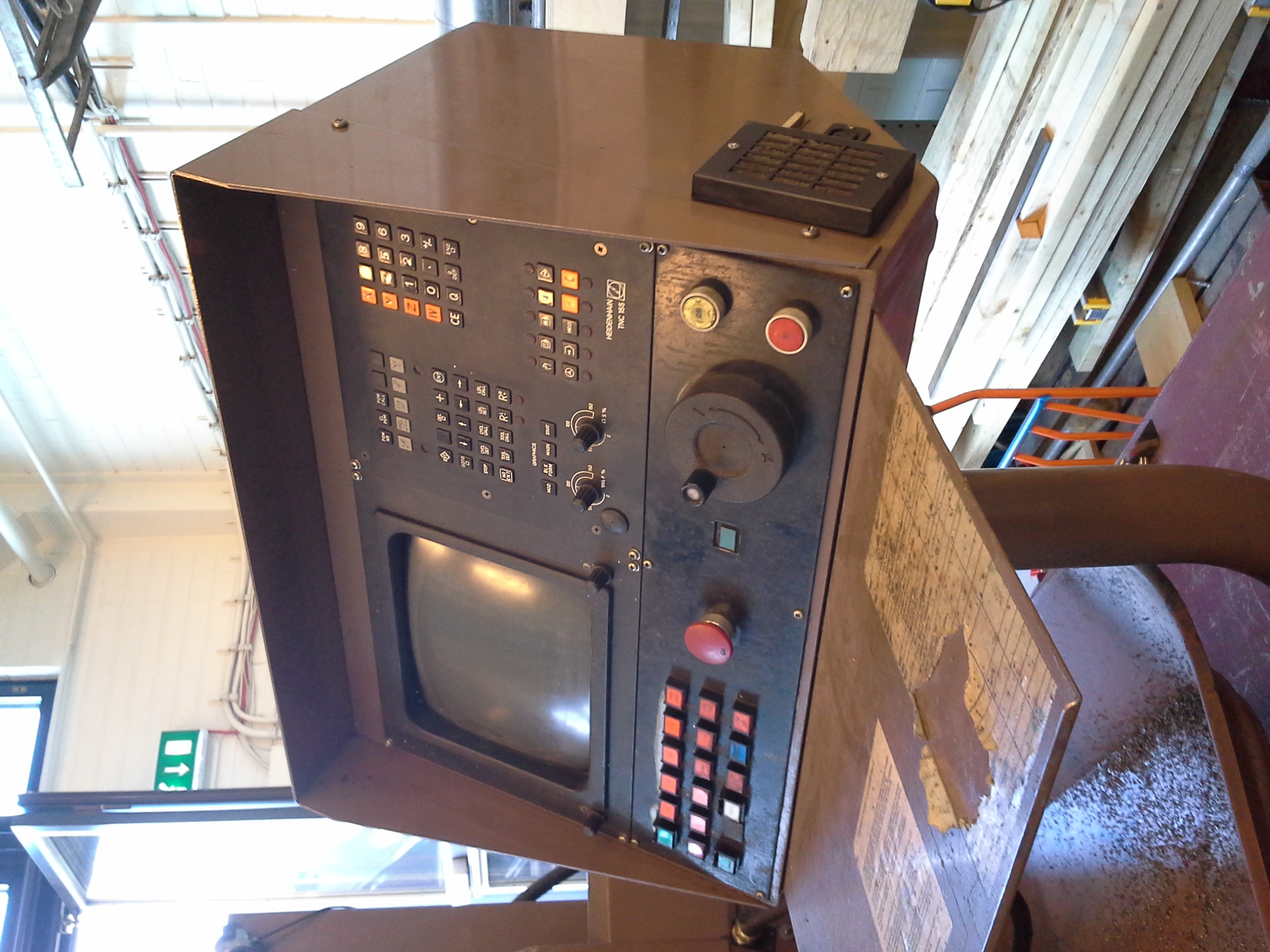





Navigate to the programming mode on a contemporary Heidenhain TNC, enter the MOD menu, and input the SIK (System Identification Key) access number: a dedicated checkbox appears on the display labeled HEIDENHAIN DNC. This single visual checkbox represents the initial gatekeeper to what the Heidenhain ecosystem designates as “DNC.” If left unchecked, the machining center operates normally, axes interpolate smoothly, and operators execute parts; however, the CNC strictly ignores high-level operational inquiries initiated from the plant network.[1]
Consequently, “Heidenhain DNC” does not refer to a singular communications protocol. Instead, it encompasses a licensed controller capability, an extensive Microsoft COM API suite, a command-line utility toolkit (such as TNCcmdPlus), and several controller-side background server daemons. This engineering analysis deconstructs that multi-tiered package: identifying which functions demand software licensing, how telemetry flows through COM interfaces, where the path diverges directly into raw LSV2 sockets, and how to maintain operational security.[1][2]

Heidenhain DNC at a Glance
| Developer | DR. JOHANNES HEIDENHAIN GmbH [1] |
|---|---|
| Architecture Type | Licensed CNC feature set + Windows COM API suite + client CLI tools (not an isolated wire protocol) [1][2] |
| Core Components | DNC Option 18, Heidenhain DNC COM Component, TNCcmdPlus / TNCremo, server background processes [1] |
| Integration Interfaces | COM objects (C#, VB.NET, C++), TNCcmdPlus CLI, raw LSV2 sockets; legacy HTML/HAP pages on older units [2][3] |
| Data Scope | NC part programs, automatic execution states, tool tables, PLC memory words, machine configuration trees [2] |
| Directionality | Bidirectional read, write, execution triggering, and file streaming; constrained by licensing and permissions [1] |
| Licensing Prerequisites | DNC Option 18 (SIK key activation); EXTERNAL ACCESS toggle enabled on machine console [1] |
| Transport & Ports | TCP 19000 for TNCcmdPlus/LSV2; TCP 19003 for observed DNC COM profile; SSH port 22 on modern TNCs [2][3] |
| Target Families | TNC 320, TNC 620, TNC 640, iTNC 530, CNCpilot 640, MillPlus IT; requires model-specific driver modules [1] |
Demarcating Heidenhain DNC: Software Suite vs. Protocol
In manufacturing engineering, “DNC” originally denoted Direct Numerical Control—the continuous transmission of NC code blocks from a minicomputer to a punched-tape-less machine tool. Within Heidenhain’s terminology, DNC signifies an enterprise integration framework that enables bidirectional program distribution, remote cycle management, and deep machine telemetry. It bundles a software license, a suite of Windows COM libraries, desktop executables, and controller-side listener daemons into an integrated solution. Treating the word “DNC” as a synonym for a specific network packet structure inevitably introduces conceptual confusion.[1]
DNC must be rigorously distinguished from LSV2. LSV2 is the low-level, eight-byte-header binary telegram protocol circulating across the network socket. Heidenhain DNC is the commercial software platform that exposes, licenses, and packages those communication capabilities for enterprise systems. Similarly, DNC cannot be equated with MTConnect: MTConnect is an open, read-only semantic dictionary based on XML/REST HTTP, whereas Heidenhain DNC is a vendor-proprietary, licensed, read/write integration environment.[1][3]
The First Gate: The SIK Checkbox and Console Permissions
The authorization chain originates directly on the CNC console. On modern TNCs, a service technician accesses the MOD function in programming mode, inputs the SIK password, and navigates to the software options table. There sits the HEIDENHAIN DNC checkbox. If Option 18 is unpurchased or inactive, the controller systematically declines high-level operational commands. Socket handshakes may succeed, but queries for execution states, active program names, and tool numbers return access-denied errors.[1]
The second layer is operator authorization. The machine parameters must have EXTERNAL ACCESS toggled on. In facilities enforcing strict security policies, remote connection requests require physical operator confirmation on the TNC touch panel before the session binds. Heidenhain DNC is never a “plug-and-play” network connection; licensing, console configuration, and physical access controls form a triad that must align simultaneously.[1]
The Second Layer: The Windows COM API Surface
On host systems running Windows, Heidenhain DNC encapsulates its functionality within Component Object Model (COM) interfaces. Client applications instantiate a central JHMachine object, establish a session to the machine’s IP address, and request specific functional interfaces tailored to their operational scope. Inspection of the DNC development kit reveals a structured modular hierarchy:
| COM Interface | Functional Scope | Typical Industrial Application |
|---|---|---|
| JHAutomatic | Program selection, cycle start, feed hold, abort; override polling and writing | Automated manufacturing cells and robotic loading systems |
| JHDataAccess | Access to tool tables, PLC words, configuration parameters, kinematics, and HWS | Structured parameter inspection and tool data synchronization |
| JHFileSystem | Directory enumeration, file download, upload, and deletion across TNC drives | CAM-to-CNC NC program distribution and archiving |
| JHPlc / JHProcessData | Interrogation of PLC markers, timers, counters, and cutting time metrics | Shop-floor OEE tracking and condition-based maintenance |
| JHAxesData | Current axis positions (machine, nominal, distance-to-go) and tool geometries | Digital twins, trajectory monitoring, and tool management |
The JHAutomatic interface carries profound operational influence. Beyond simply reading feed rate and spindle speed overrides, it can command the CNC to select a specific part program, initiate automatic cycle execution, or abort an in-progress operation. The interface reports nuanced machine availability states, including DNC_STATE_MACHINE_IS_AVAILABLE, DNC_STATE_DNC_IS_STOPPED, DNC_STATE_WAITING_PERMISSION, and DNC_STATE_NO_PERMISSION. A responsive telemetry system must process these discrete machine states individually rather than treating the connection as a simplistic binary status.
Data access via JHDataAccess is similarly partitioned into dedicated sub-modes: TABLEDATAACCESS, PLCDATAACCESS, CFGDATAACCESS, GEODATAACCESS, SPLCDATAACCESS, and HWSDATAACCESS. Each mode may demand unique password credentials and administrative privilege sets, proving that declaring “DNC is connected” reveals nothing about which specific data structures are authorized for retrieval.
The Third Layer: Network Transports and Socket Bindings
Beneath the COM abstraction layer, network traffic travels across several documented transport mechanisms. The command-line utility TNCcmdPlus connects to the CNC using an IP address and port parameter (commonly target_ip:19000). In contrast, the Heidenhain DNC COM client establishes its connection profiles using separate registry definitions, where port 19003 has been observed on production TNC640 installations.[2][3]
Integrators must never conflate these two port numbers. Port 19000 is the well-known socket for raw LSV2 telegram communication. Port 19003 represents an abstraction port mapped by the Heidenhain DNC COM server runtime; it is not a universally standardized alternative for raw LSV2. Target CNC generation, DNC component software version, and connection profiles alter these settings, meaning port values must always be validated per asset.[2]
Automated program distribution represents one of DNC’s most critical functions, yet it carries considerable operational risk. If an NC part program transfer terminates prematurely during network degradation, an operator could potentially execute an incomplete machining cycle with catastrophic consequences. Reliable DNC pipelines must implement atomic file handling: uploading files to a staging directory, verifying cryptographic hashes, and renaming them into the production directory only upon successful integrity checks. Software reliability, rather than the raw communication speed, determines shop-floor safety.
First Engineering Twist: DNC is a Multi-Generation Family, Not a Single Tool
Inspecting a complete Heidenhain DNC distribution archive (such as release 1.7.1) reveals an extensive software hierarchy rather than an isolated binary. Beside the central COM component sit specialized server modules engineered for distinct hardware lineages: CNC4290, iTNC, MillPlus, and NCKern. Heidenhain maintains dedicated bridge modules beneath the overarching “DNC” banner to handle divergent generational quirks.
The primary engineering question in any DNC deployment is therefore: “Which CNC generation is installed, and which specific DNC software package version supports it?” An iTNC 530 running legacy software requires entirely different server modules than a contemporary TNC 640 or TNC7. Additionally, 32-bit legacy COM DLLs cannot be loaded directly into 64-bit application runtimes; systems architects must incorporate out-of-process COM surrogates or 32-bit middleware gateways into their infrastructure designs.
Second Engineering Twist: Connecting Does Not Imply Data Access
The most pervasive misconception in shop-floor telemetry is confusing a successful TCP handshake with genuine data acquisition. If Option 18 is unlicensed, if console permissions are withheld, or if an incorrect data mode is selected, the TCP socket will connect smoothly while queries return null or access violation codes. Supervisory dashboards that report machines as “connected” based purely on socket ping status provide false assurance.[1]
When Option 18 is absent, operations do not face an absolute dead end. A proven engineering alternative on unoptioned machines is querying operational variables directly from the controller’s symbolic PLC memory markers. While this requires access to the machine builder’s PLC documentation and offers a narrower telemetry dataset, it bypasses Option 18 restrictions entirely. Understanding whether machine data originates from high-level DNC objects or low-level PLC markers is the core diagnostic skill in Heidenhain integration.[1]
Third Engineering Twist: Three Distinct Integration Pathways
Engineers integrating Heidenhain controls can select among three architectural paths. The first is the official Heidenhain DNC COM package: vendor-supported, feature-complete, and robust, but tied to Windows runtimes and subject to component licensing. The second path is raw LSV2 socket integration: lightweight, cross-platform (Linux/ARM friendly), but dependent on community-mapped specifications and exposed to firmware timing changes. The third path, applicable to older units, involves scraping legacy embedded HTML status pages: fragile and slow, but occasionally the sole available option on unoptioned vintage assets.[2][3]
Robust enterprise architectures do not mix these three mechanisms haphazardly across a single production line. They standardize on a single primary pathway per machine generation, maintaining secondary methods solely as documented fallback contingencies.
Architecture Comparison: DNC COM vs. Raw LSV2 vs. MTConnect
| Technical Criteria | Heidenhain DNC COM | Raw LSV2 Protocol | MTConnect Standard |
|---|---|---|---|
| NC Program Distribution | Full Native Support | Full Native Support | Not Supported (Read-only) |
| Vendor Support & Certification | Official Vendor Solution | Community / Reverse Engineered | Open Industry Standard |
| Host OS Portability | Windows Only (COM runtime) | High (Pure TCP sockets) | High (HTTP/REST) |
| Multi-Vendor Fleet Usability | Heidenhain Only | Heidenhain Only | Universal Standard |
| Ideal Deployment Target | Enterprise CAM/MES, robotic cells | Lightweight Edge devices, gateways | Enterprise OEE, plant dashboards |
Seven Rules for Reliable DNC Integration
- Verify Option 18 Status: Confirm whether the HEIDENHAIN DNC option is enabled in the SIK options menu before drafting integration code.
- Enable Machine Console Permissions: Activate
EXTERNAL ACCESSin the CNC settings and establish clear operating procedures for operator confirmation prompts. - Enforce Least-Privilege Separation: Separate monitoring accounts from file distribution accounts and remote execution automation profiles.
- Map Software Package Compatibility: Confirm that the installed Heidenhain DNC software build matches the CNC firmware generation, accounting for 32/64-bit COM requirements.
- Validate Network Port Mappings: Distinguish clearly between port 19000 (TNCcmdPlus/LSV2), port 19003 (DNC COM profile), and SSH port 22.
- Isolate Industrial Networks: Host DNC gateway servers on segregated manufacturing VLANs; prevent direct exposure to corporate office networks.
- Implement Atomic File Transfers: Upload part programs to temporary staging areas with hash verification before transferring them into active execution folders.
Conclusion: Opening the Port Does Not Confer Authority
Achieving a successful network socket connection to a Heidenhain TNC represents merely the outer threshold of integration. The genuine engineering effort centers on software licensing validation, selecting appropriate data access modes, and managing operator authorization boundaries. A single machining center may grant one client read-only status telemetry while permitting another to overwrite part programs; this distinction is governed by licensing and software policy rather than the physical cable.
Is the HEIDENHAIN DNC checkbox actively enabled across your TNC fleet, or are your telemetry collectors reading from PLC markers? And do your file distribution workflows employ atomic transfer verification to prevent corrupted program execution?
This technical dossier is the fourth installment in our CNC control protocol series. For physical serial links, consult our RS-232 engineering guide; embedded signal physics are detailed in our analysis of I2C, SPI, and UART.
Verified Sources and Technical References
- inventcom • DNC Option 18: SIK authorization, HEIDENHAIN DNC checkbox, and unoptioned PLC fallback methods • inventcom.net
- inventcom • Heidenhain PLC telemetry: TCP 19000, COM profile 19003, and SSH port 22 • inventcom.net
- pyLSV2 • Project repository and technical notes: LSV2 scope, SSH tunneling, and multi-generation testing • github.com/drunsinn/pyLSV2