 EN
EN TR
TR DE
DE FR
FR ES
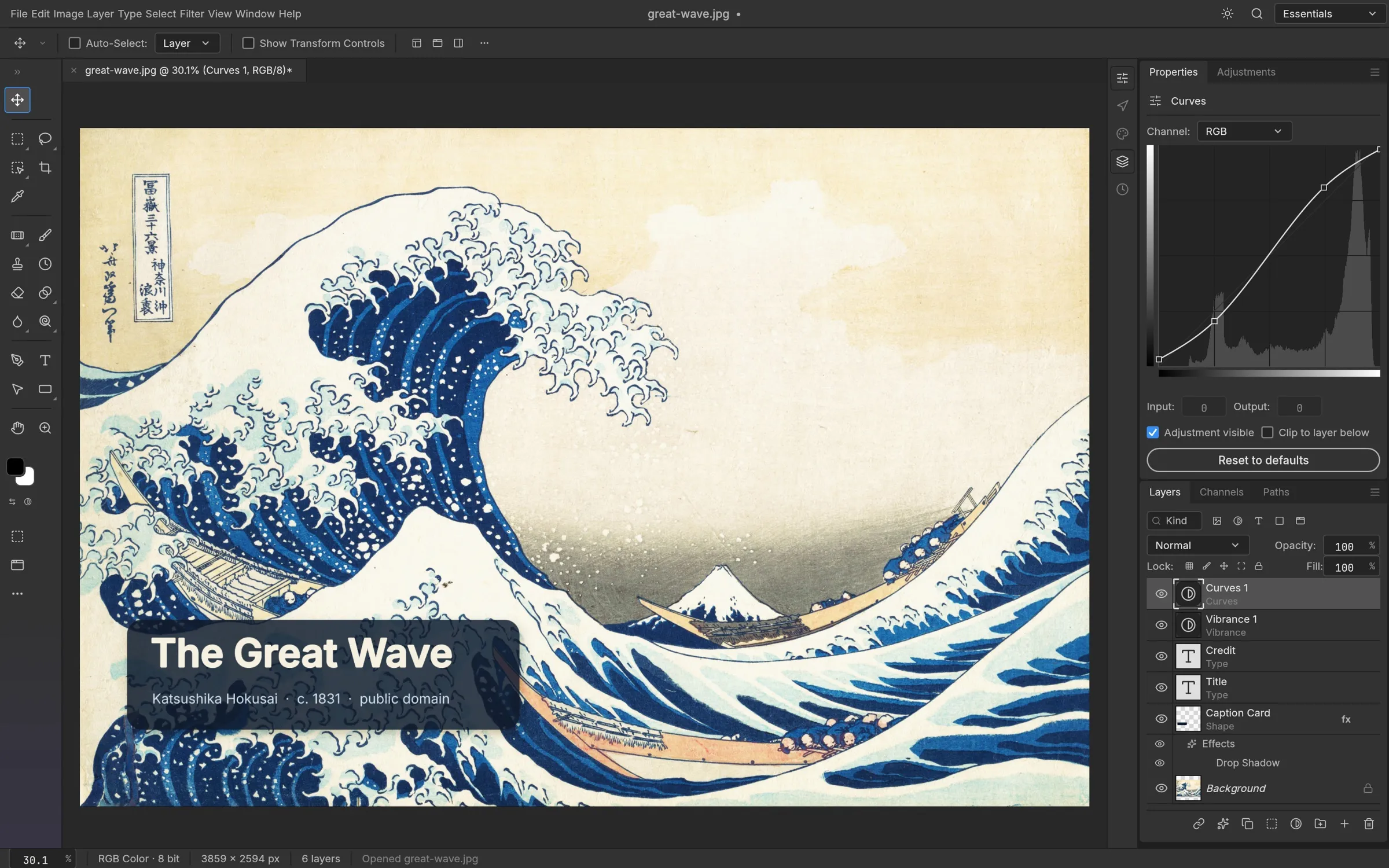
ESAdobe’s mandatory monthly Creative Cloud subscriptions and aggressive cloud telemetry policies have pushed artists and graphic designers to search for open-source solutions. However, while GIMP and Krita are powerful, their interface paradigm breaks familiar Photoshop muscle memory. This is where PhotoCraft, built from the ground up in 100% pure Rust, delivers a revolutionary transition by mirroring Photoshop’s exact panels, toolbars, and layer ergonomics [1, 2].
⚡ PhotoCraft Hızlı Bakış (Data at a Glance)
• Geliştirici & Mimari: ArtCraft Suite • %100 Saf Rust (Pure Rust)
• Hedef Yazılım: Adobe Photoshop ($239.88/yıl abonelik yerine ücretsiz)
• Klon Türü: Birebir UI-Twin (Sol dikey araçlar, sağ paneller, V/M/L/W/C/B kısayolları)
• Dosya Formatları: Tam PSD katman desteği, WebP, PNG, JPEG, SVG dışa aktarım
• Gizlilik: %100 Çevrimdışı, sıfır telemetri, bulut zorunluluğu yok
Photoshop Muscle Memory: Zero Learning Curve
PhotoCraft’s foundational design philosophy is that any graphic artist accustomed to Photoshop can start working immediately without reading documentation. Every tool on the vertical toolbar maps to its exact Photoshop hotkey:
• V: Move Tool
• M: Rectangular & Elliptical Marquee
• L: Lasso & Polygonal Lasso
• W: Quick Selection & Magic Wand
• C: Crop Tool
• B: Brush Tool
• G: Gradient & Paint Bucket
• P: Vector Pen Tool
• T: Typography & Text Tool
Why 100% Pure Rust Architecture? Speed & Memory Safety
Many contemporary creative tools rely on bloated Electron wrappers that consume gigabytes of RAM. PhotoCraft is compiled natively in pure systems-level Rust [2], providing:
1. Instant Launch: Cold boot time under 1 second.
2. Ultra-light Memory Footprint: Consumes only ~120 MB RAM on idle.
3. Zero Garbage Collection: Pixel rendering and brush strokes run on bare-metal multi-threading without stutter.
4. 100% Offline & Private: Zero analytics or telemetry; your assets stay strictly local.
Layers, Masks, and Native PSD File Compatibility
The biggest fear when leaving Photoshop is losing access to archived PSD projects. PhotoCraft natively parses and writes Adobe PSD files, preserving blending modes (Multiply, Screen, Overlay), clipping masks, vector shape layers, and editable text layers [1, 2]. You can save projects in layered PSD format or export to production-ready WebP, PNG, and JPEG.
Why Choose PhotoCraft Over GIMP and Krita?
• Versus GIMP: GIMP is immensely powerful, but its selection workflows, transformation handles, and layer style ergonomics differ sharply from Photoshop, causing significant cognitive friction for veteran users. PhotoCraft removes this barrier.
• Versus Krita: Krita excels in digital concept art and brush simulation. However, for UI mockups, commercial photo retouching, and quick graphic production, Photoshop users miss the classic panel ergonomics that PhotoCraft faithfully delivers.
Download & System Requirements
PhotoCraft runs as a lightweight native binary across all major desktop platforms:
• Windows: Windows 10 & 11 (64-bit installer & portable binary)
• macOS: macOS 12+ (Universal binary for Apple Silicon M-series & Intel)
• Linux: All standard distributions via Flatpak and AppImage
PhotoCraft’ı Deneyin
Abonelik ödemeden, kas hafızanızı koruyarak Photoshop deneyimini yerel makinenizde yaşayın.
Resmi İndirme Sayfası (getartcraft.com) ↗📚 Doğrulanmış Kaynaklar & Referanslar
[1] Clones of Popular Software Ecosystem (Clonesof): PhotoCraft technical architecture, Photoshop UI parity, and shortcut mapping inventory. clonesof.com/photocraft
[2] ArtCraft Official Documentation: PhotoCraft: The image editor you already know how to use. Rust native rendering pipeline and offline-first telemetry policy. getartcraft.com/apps/photocraft
[3] The Rust Programming Language (Systems Architecture): Memory safety without garbage collection in high-performance digital image processing pipelines. rust-lang.org
[4] Adobe Photoshop File Format Specification: Adobe Systems Incorporated technical specification for Photoshop Document (PSD) layered raster data structures. adobe.com/photoshop/fileformat