


📺 Video Overview & Quick Summary
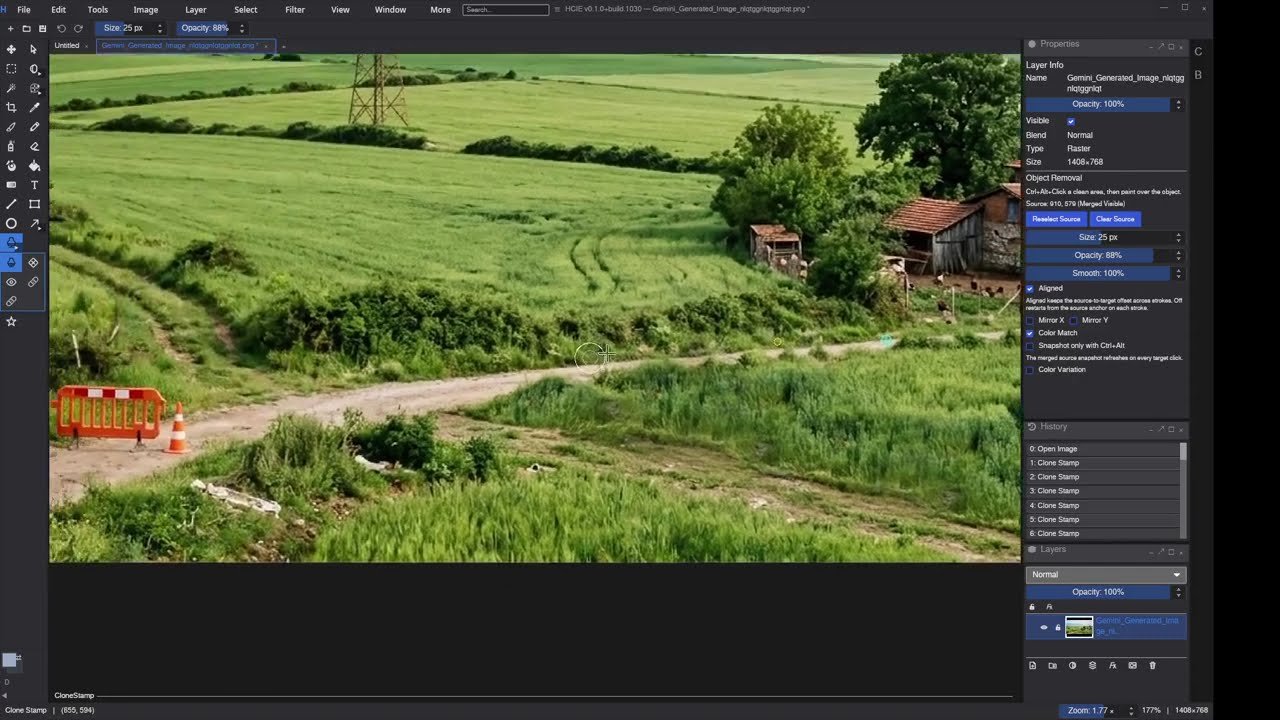
Welcome to this official DigiLiner tutorial and showcase guide. In this post, we break down the core techniques, workflows, software tools, and step-by-step procedures demonstrated in our video: “How to Remove Objects from Photos with Stamp Tool”. Follow along below with the structured written instructions and practical tips.
🖌️ Professional Photo Retouching: Clone Stamp Mastery
Removing unwanted objects, blemishes, power lines, or background distractions from photographs is a fundamental skill in digital image editing. While modern AI removal tools exist, mastering the manual Clone Stamp tool gives you 100% pixel-level precision, non-destructive control, and flawless texture preservation.
1. Non-Destructive Workflow Setup
- Always create a new transparent layer above your base image named “Retouch_Stamp”.
- Select the Clone Stamp Tool (S) and set its sample source to “Current & Below” (or “All Layers”). This ensures your original photo remains completely untouched.
- Choose a soft round brush with 0% to 25% Hardness to ensure seamless edge feathering into neighboring pixels.
2. Step-by-Step Object Removal Process
- Identify Natural Light & Texture Patterns: Look for source areas that match the exact lighting angle, grain structure, and color tone of the area behind the object you wish to remove.
- Sample Clean Source Pixels: Hold
Alt(orOptionon Mac) and click to sample the clean background texture. - Align and Paint with Short Strokes: Paint over the unwanted element using short, deliberate clicks. Frequently re-sample new source points to avoid repeating visible stamp patterns.
- Refine Complex Edges: Near structural lines (walls, horizon lines, roads), align the brush crosshair directly along the line trajectory to maintain perfect linear continuity.
🔔 Subscribe to DigiLiner on YouTube
Enjoyed this video tutorial and showcase? Subscribe to our official channel for more tutorials on 3D design, AI digital art, programming, retro computing, and high-quality production guides.
▶ Subscribe on YouTube (@digiliner)