




At a Glance: Jellybone Profile & Core Mechanics
| Title | Jellybone (2D Match-3 Casual Puzzle Game) |
|---|---|
| Historical Android Package ID | com.halitcan.jellygardencrush (Google Play listing is currently inactive — archive record) |
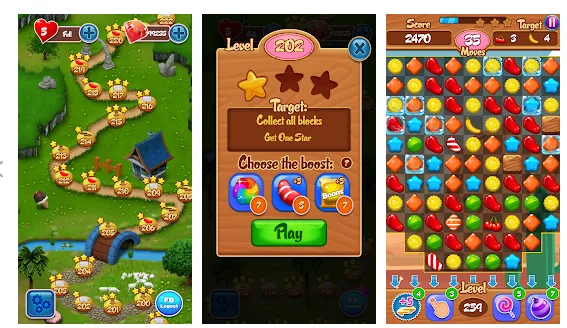
| Genre & Level Depth | 2D Match-3 Puzzle; 100+ stages (screenshot map visibly extends to Level 259) |
| Game Modes | Timed mode, move-limit mode, ice/wooden block clearing, and item-collection missions |
| Special Boosters | 4-match → Candy Bomb (+1 lightning bonus); 5-match → Candy Swirl (+2 lightning bonus); Color-Changing Jewel Candy |
| Source Code / Engine Status | The internal engine and source code are not public; the engineering analysis below examines general 2D Match-3 architectural standards. |
Jellybone is a classic mobile Match-3 project preserved in the DigiLiner archive. Although its Google Play listing is no longer online, we document its verified rule set here and examine the algorithms and memory discipline required behind the scenes to keep a 2D puzzle game responsive.
Cold Open: The “It’s Just Three Candies in a Row” Illusion
A commuter’s thumb slides across the glass inside a subway car. Two colored jellies trade places, a row of three bursts apart, fresh tiles drop from above, and one of the wooden or ice barriers at the bottom cracks open.
To an outside developer glancing over someone’s shoulder, the first thought is almost always the same: “You’re just clearing three matching squares on an 8×8 grid—it shouldn’t even take a weekend.”
Yet the moment you start writing the code, a completely different set of problems surfaces. What happens if the player taps the screen mid-animation? How do you know when a chain reaction of falling cascades has truly settled? If zero valid moves remain on the board, does the game freeze, or does it quietly reshuffle the grid? And how do you hold a locked 60 FPS on a budget smartphone without a single millisecond hitch during explosions [1], [2]?
Using the Jellybone archive as our starting point, let’s examine both its documented gameplay rules and the engineering machinery powering a reliable 2D Match-3 engine.
1. Jellybone’s Documented Gameplay & Rule Set
The archived listing and the captured screenshots above confirm several concrete design pillars:
- Map Progression & Stage Depth: While historical descriptions highlight “more than 100 levels,” the screenshots visibly confirm a progression path reaching Level 220 and an active gameplay board at Level 259.
- Multi-Objective Board Mechanics: Progression relies on more than raw score chasing. The game combines timed rounds, strict move budgets (such as 35 moves on Level 259), breakable ice and wooden block clearing (Level 202: “Collect all blocks”), and ingredient-drop objectives that guide items down to the bottom edge (collect 3 cherries, 4 bananas).
- Special Candy Combination Rules:
- 4-Match: Produces a Candy Bomb and grants a +1 lightning bonus, blasting adjacent neighboring tiles on impact.
- 5-Match: Produces a Candy Swirl and awards a +2 lightning bonus.
- Color-Changing Jewel Candy: Clears every other candy on the board that shares the selected color.
(Note: The Google Play Store listing associated with package ID com.halitcan.jellygardencrush is no longer active and returns HTTP 404. Because no public source-code or engine documentation discloses how Jellybone was built internally, the sections below analyze industry-standard software architecture for 2D Match-3 titles sharing this rule set rather than Jellybone’s private implementation.)
First Turning Point: Driving Game Logic with Pixel Coordinates
The single most common trap for a team building a Match-3 game is binding the board’s logical state to the X/Y pixel positions of on-screen Sprite objects.
If your code asks “do the pixel bounds of these two tiles overlap?” or relies on a physics engine (Rigidbody2D) and simulated gravity collisions to stack falling candies, two failures become inevitable:
- Race Conditions: If a player swipes another candy while a previous tile is still mid-drop, pixel coordinates desynchronize and pieces can freeze mid-air.
- Non-Determinism: Sub-pixel physics drift leaves tiny misaligned gaps along board corners and breaks strict grid alignment.
Resilient Architecture: Discrete Logical Matrix + Finite State Machine
In a dependable Match-3 engine, the board is modeled first as a pure two-dimensional integer or struct matrix in RAM (board[row, col]). On-screen visuals (the View layer) act strictly as a presentation layer that animates transitions between matrix states using timed tween curves [2]. Maintaining a one-way flow from logical grid coordinates to screen pixels guarantees that animation timing can never corrupt board rules.
WaitingForInput (Input Open) ──(Two neighbors swap)──▶ Swapping (Input Locked)├── NO Match ──▶ Reverse Swap Tween ──▶
WaitingForInput└── Match FOUND ──▶
Clearing (Pop & Score) ──▶ Falling & Refill (Grid Gravity)├── Cascade Match FOUND ──▶ Back to
Clearing└── Cascade FINISHED ──▶
DeadlockCheck (Any Valid Move?) ──▶ WaitingForInput
This state-machine discipline locks user taps cleanly whenever animations are running; no tile stalls mid-drop, and no second swap can slip in before a cascade finishes resolving [2].
2. Deadlock Solver & Cascade Scanning
On an asymmetric stage with cut corners or ice blockers—much like Level 259—one of the sharpest design hazards is Deadlock: the board is full of candies, yet not a single adjacent swap yields a row or column of three.
To prevent silent soft-locks, a Look-Ahead Move Solver runs in milliseconds as soon as every cascade settles:
- Each playable cell
(r, c)is temporarily swapped solely inside the logical matrix with its right neighbor(r, c+1)and bottom neighbor(r+1, c). - A fast horizontal and vertical match check (
>= 3) evaluates the candidate state, then immediately restores the matrix. - The search terminates the instant it finds a single valid move (
early exit). If the entire board returns zero valid swaps, the state machine transitions into an automatic Shuffle state before handing control back, rearranging tiles so at least one playable three-match exists without triggering an instant unintended match.
Intersection & Special Tile Priority Rules
During horizontal and vertical scans, L-shaped or T-shaped intersections—as well as four- or five-tile runs—must trigger special boosters reliably. Following rules like Jellybone’s 4-match Candy Bomb or 5-match Candy Swirl, the solver marks and merges overlapping cells belonging to the same match cluster before placing a single booster on the player’s target swap cell. Without that merge pass, one intersection could accidentally spawn two conflicting special candies or prioritize the wrong tile during a chain reaction.
// Tests whether the logical matrix contains at least one valid adjacent swap
public static bool HasAnyValidMove(int[,] board)
{
    int rows = board.GetLength(0);
    int cols = board.GetLength(1);

    for (int r = 0; r < rows; r++)
    {
        for (int c = 0; c < cols; c++)
        {
            if (board[r, c] <= 0) continue; // Empty slot or unbreakable blocker

            if (c + 1 < cols && TrySwapHasMatch(board, r, c, r, c + 1))
                return true;

            if (r + 1 < rows && TrySwapHasMatch(board, r, c, r + 1, c))
                return true;
        }
    }
    return false;
}
Notice that HasAnyValidMove checks only the right and bottom neighbors; left and top neighbors were already tested symmetrically on earlier iterations. On an 8×8 grid, this halves the search cost and resolves worst-case boards in just a few dozen fast array lookups.
Second Turning Point: Mobile Garbage Collection & Draw Call Bottlenecks
A 2D puzzle prototype that feels effortless on a desktop workstation can still exhibit jarring micro-stutters during explosions on a low-end Android handset. More often than not, the culprit is not raw CPU clock speed—it is heap allocation churn and unbatched texture switches:
1. Object Pooling
If your game calls Destroy on every popped candy and allocates a fresh object for every replacement tile dropping from the top, hundreds of transient objects flood the managed heap within seconds. When the Garbage Collector wakes up to reclaim them, the frame rate visibly hitches [1].
The Fix: Pre-allocate a fixed pool of candy and particle objects at startup (Object Pool). When a tile clears, it is deactivated and returned to the pool rather than destroyed; when a replacement falls in, the same memory slot is reactivated with its new sprite and color index [1], [3]. Even massive multi-stage cascades stay near zero allocations.
2. Sprite Atlasing to Slash Draw Calls
Sending red jellies, blue stars, yellow discs, bombs, cherries, and HUD icons to the GPU as separate texture files forces a distinct Draw Call and GPU state switch (SetPass) on texture boundaries. Packing all board and effect sprites into a unified Sprite Atlas dramatically lowers draw call overhead and helps preserve mobile battery life [4].
At 60 FPS, a mobile game has strictly 16.67 milliseconds to complete logic, matrix scans, sprite batching, and particle rendering for every frame. Adding a few pixels of padding around each icon inside the atlas is a small but vital detail that stops neighboring tile edges from bleeding into each other under scaling or varied screen DPIs [4].
3. Weighted Balance & Pacing in Level Design
Advanced boards like Level 202 and Level 259 break clean symmetry: corners are clipped away, vertical lanes narrow for dropping cherries and bananas, and multi-hit ice or wooden blockers constrain movement. Under those conditions, a naive uniform random generator can deal either frustrating strings of deadlocked turns or accidental one-move board wipes. A calibrated level manager weights incoming tile colors against remaining blockers and the remaining move budget, keeping tension fair rather than erratic.
Decision Matrix: Sound Choices in 2D Puzzle Architecture
| Layer / Problem | Fragile Prototype Approach | Resilient 2D Game Architecture |
|---|---|---|
| Board Physics | 2D Physics Colliders (Rigidbody2D gravity settling) |
Pure 2D Integer Matrix + Timed Tween Animation |
| Input Handling | Free clicks every frame (Race condition risk) | Finite State Machine Input Lock [2] |
| Memory Lifecycle | Continuous Instantiate / Destroy (GC spikes) |
Pre-Warmed Object Pool [1], [3] |
| Graphics Batching | Dozens of separate PNG textures | Unified Sprite Atlas Package [4] |
| Deadlock Risk | No look-ahead (Player stuck on unplayable grid) | Post-Cascade Look-Ahead Scan + Auto-Shuffle |
If you want to compare modern indie engines and open-source tools for building 2D games, explore our Godot 4.7.2 Review and our 239 Best Free & Open-Source Windows Software Directory.
Closing: Simplicity Demands More Discipline Than It Shows
On the surface, a mobile Match-3 game promises colorful tiles and a five-minute break. Beneath that effortless 16.67-millisecond frame budget sits a deterministic state machine, cascade match detection, look-ahead deadlock scanning, and disciplined memory pooling. The Jellybone archive stands as a clear period snapshot of how this classic puzzle loop was packaged inside a clean, approachable mobile interface.
- When a puzzle board hits a deadlock, do you prefer an automatic invisible reshuffle, or giving players a limited manual “shuffle” charge as part of the strategy?
- When building 2D mobile puzzle games, do you strictly separate a pure matrix + tween layer, or do you ever lean on physics-driven falling mechanics?
Verified References
- [1] Robert Nystrom: Game Programming Patterns — Object Pool Pattern. Available at: https://gameprogrammingpatterns.com/object-pool.html
- [2] Robert Nystrom: Game Programming Patterns — Finite State Machines & State Pattern. Available at: https://gameprogrammingpatterns.com/state.html
- [3] Unity Scripting Reference:
UnityEngine.Pool.ObjectPool<T>Memory Pooling API. Available at: https://docs.unity.com/en-us/engine/6000.6/script-reference/unityengine/pool/objectpool1 - [4] Unity User Manual: Sprite Atlas — Texture Packing & Draw Call Optimization. Available at: https://docs.unity3d.com/2023.2/Documentation/Manual/class-SpriteAtlas.html