




The rapid proliferation of independent 3D printing repositories—such as Thingiverse, Printables, MakerWorld, Cults3D, and MyMiniFactory—has scattered millions of printable files across the web. For makers, rapid prototyping engineers, and hobbyists, visiting each platform individually to find a replacement appliance part or miniature often results in significant inefficiency. Established in Germany in 2013 by Sebastian Schürmann, Yeggi functions as a keyword search engine for 3D printing [1][2].
By continuously operating specialized web crawlers across more than 30 major online repositories, Yeggi indexes over 5 million 3D printable models in real time. It unifies search across the fragmented maker ecosystem, providing instantaneous cross-platform comparison, keyword popularity analytics, and reliable deep-links to original host repositories [1][3].
⚡ Data at a Glance
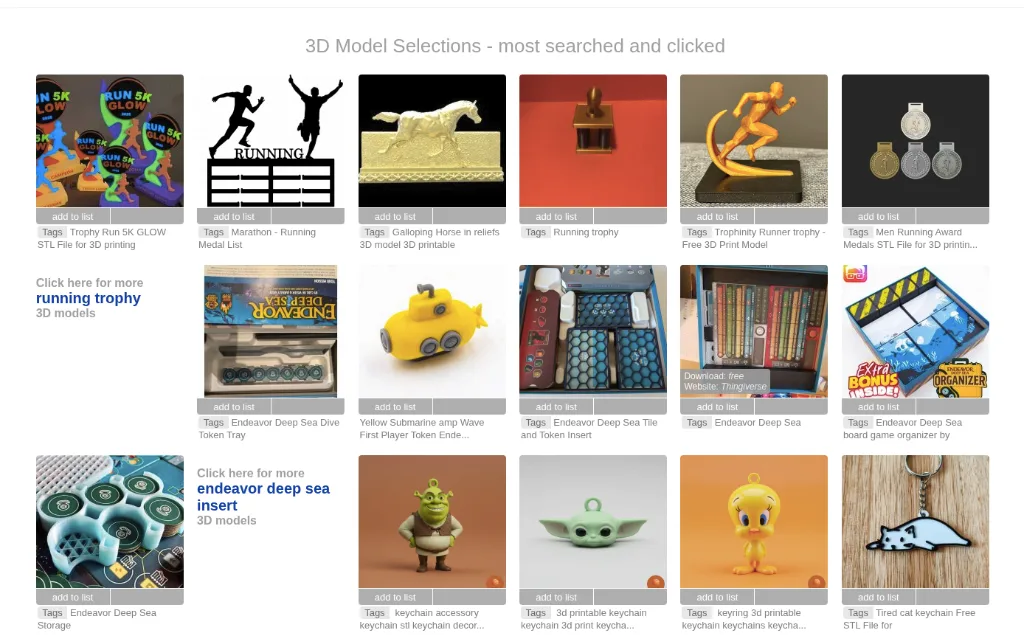
A Web-Scale File Crawler for 3D Printing
Yeggi operates through an automated crawler infrastructure that parses new releases across 30+ 3D printing portals on a 24/7 cycle [1][3]. Rather than forcing users to open ten browser tabs, a single query aggregates matches from:
- Open Community Libraries: Thingiverse, Printables, MakerWorld, and YouMagine [2][3].
- Commercial Maker Marketplaces: Cults3D, MyMiniFactory, and CGTrader [3][5].
- Engineering & CAD Hubs: GrabCAD and specialized parametric part repositories [4].
By extracting titles, tags, preview thumbnails, upload dates, and pricing data, Yeggi computes real-time popularity scores based on community search volume and outgoing click-through rates [1][2].
Real-Time Price & License Filtering
One of Yeggi’s most practical features is its instantaneous ‘Free Models Only’ filter. With thousands of commercial listings entering marketplaces daily, hobbyists seeking open-source designs can eliminate paid paywalls with a single click. Conversely, commercial studios looking for premium, pre-supported tabletop figurines can filter specifically for commercial designs within defined price tiers ($1 – $10+) [1][5].
Competitive Comparison: 3D Printing Search Engines vs. Native Repositories
| Platform | Platform Type | Indexed Scope | Search Technology | File Hosting | Best Application |
|---|---|---|---|---|---|
| Yeggi | Dedicated Vertical Search Engine | 5,000,000+ files across 30+ websites | Keyword & Popularity Algorithms | Deep-links to source hosts | Fast multi-site discovery & price comparison |
| Thangs 3D | AI Geometric Search & Platform | 15,000,000+ indexed models | Geometric AI Shape Matching + Keywords | Hybrid (Native hosting + external index) | Finding parts by 3D geometric shape and CAD revision |
| STLFinder | Lightweight Keyword Indexer | 2,000,000+ files | Basic keyword matching | Deep-links only | Simple fallback keyword searches |
| Thingiverse | Native Open Repository | 2,500,000+ free designs | Internal site search | Direct file download | Free open-source maker community sharing |
| Printables | Curated Manufacturer Hub | 500,000+ verified models | Internal search + Slicer integration | Direct download with print profiles | High-reliability prints, Prusa/Bambu profiles |
Diagnostic Troubleshooting & Best Search Practices
Symptom: Clicking a promising search result on Yeggi redirects to a “Page Not Found (404)” error on Thingiverse or Cults3D.
Resolution: Model authors occasionally rename, delete, or make models private after Yeggi’s crawler indexes them. Copy the exact model title from Yeggi’s preview snippet and paste it into Yeggi enclosed in quotation marks (e.g., "Articulated Dragon V3") or perform a Thangs geometric query to locate mirror re-uploads hosted across alternative repositories.
Symptom: A result marked as “Free” redirects to a repository page where only a base pedestal is free, while the main miniature requires a paid membership.
Resolution: Use negative keyword operators in the Yeggi search bar. Append terms like -patreon -sample -promo to filter out teaser listings, or inspect the preview thumbnail for commercial studio branding watermarks before navigating out.
Symptom: An indexed model appears printable in the thumbnail but fails slicing in Bambu Studio or PrusaSlicer with “Mesh has non-manifold edges” warnings.
Resolution: Some aggregators scrape raw video game meshes containing zero-thickness shells and inverted normals. Run suspect STL files through Microsoft 3D Builder (Automated Netfabb Repair) or PrusaSlicer’s built-in Fix via Netfabb service before sending them to the printer.
Pros and Cons
Advantages
- Indexes over 5 million 3D printable files across 30+ platforms simultaneously.
- Instantaneous 1-click filter between Free and Commercial models.
- Eliminates hours of manual searching across fragmented individual websites.
- Live keyword ranking highlights current maker community printing trends.
- 100% free search tool with fast response times and zero mandatory registration.
Disadvantages
- Does not host files directly; downloads require visiting external host sites.
- Occasional dead links caused by external authors deleting files on host repositories.
- Keyword-only search without 3D geometric shape-matching capabilities.
Frequently Asked Questions (FAQ)
Verified Sources & References
- Yeggi 3D Search Engine Official Portal — Global keyword search index for 3D printable files and popular maker query trends.
- All3DP: The Best 3D Print Model Search Engines & Repositories — Industry analysis of vertical 3D search engines and multi-platform indexing.
- 3D Printing Industry News & Repository Analysis — Historical coverage of repository fragmentation and aggregator search engines.
- Aniwaa 3D Hardware & Asset Guide — Comparative breakdown of printable file search tools and license compliance.
- Prusa Research: Slicer Compatibility & Mesh Validation Standards — Technical standards for non-manifold STL repair and 3MF packaging.
More platforms like this one are compared in our list of 3D model sites.


